
Showing posts with label Picasa. Show all posts

Thursday, January 29, 2009

Picture Header Directions

A few people have asked me how I did my picture header at the top of my blog.  So here are some rough directions.  I'm sure there are a lot of ways to get a picture header on your blog, but mine is done using the free software Picasa.  It is available for Mac and PC so you should be able to find the version that is right for your computer.

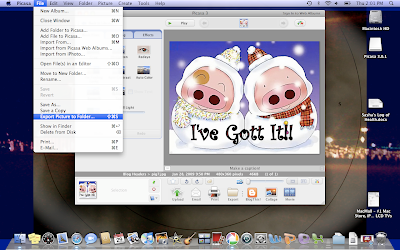
Once you have found a picture you like, save it and upload it to Picasa.  If you have a Mac, I know it will upload your pictures automatically.  After you've tweeked your picture to say what you want and look perfect, you need to export it to a file to change the size so it will fit in your header space on your blog.  Here is a screen shot from my Mac.  I believe on PC you could probably export it by going to "File" and looking for the same thing...  Export Picture to Folder.

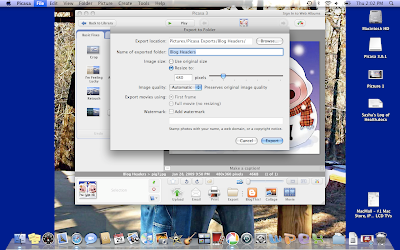
After that you should see a window pop up that will allow you to name the folder that you are exporting your picture to.  You will also see where you are able to resize your picture.  You will probably need to do this in order for your picture to fit in the header space on your blog.  I resized mine to the second lowest tick mark.  You might want to play with yours until you get it the way you want it.  Here is the screen shot:
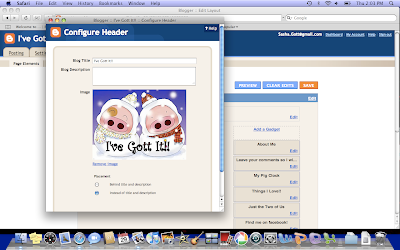
Finally go and put your new header on your blog.  You will need to go into your layout and edit your header.  Here is the last screen shot:

There ya go.  I hope that helps anyone that would like to add a fun header!!  If there are any directions that I missed please let me know.  If you need any help, feel free to ask. Have fun and good luck!!

Saturday, January 24, 2009

Picasa, Picasa, Picasa!!!

I LOVE PICASA
It is like the greatest thing ever for my Mac.  I was so upset because I could not find a good collage software for my blog.  (I was using photoscape but that doesn't work on my Mac)  One day during some "geek talk" I brought up my problem to John Bentley (he used to be my boss and he's FHU's Chief Information Officer a.k.a. computer/technology guru).  He was the one that told me about picasa being available for the Mac now.  Well like usual, he had me sold on the software once I found out all about the bells and whistles...  and the best part - it's FREE!!  If you would like to try it for yourself, here is my link:  http://picasa.google.com/mac_tools.html.

There is also a version for PC users out there somewhere.  I believe it works almost the same.  That is what was at first created before the Mac program came out.  Oh by the way, Mac users, this works GREAT with iPhoto!!  Try it out... it is super easy and fun to use.  I made a collage of some of my favorite pictures from last year as an example.  I have a lot of pictures that I just had to include.  If you click on the collage it will easily fill up your computer screen and you can clearly see all the pictures close up!! :o)

 
Posted by Picasa